Core workflows
Asking questions in chat
Plain-language questions, cited answers, scoping and commands.
Chat is where you ask questions in plain language and get cited answers drawn from your documents.
Ask your first question
- Open Chat from the sidebar.
- Select a starter prompt or type your own, e.g. "What were the main drilling hazards in the Tasman-4 well report?"
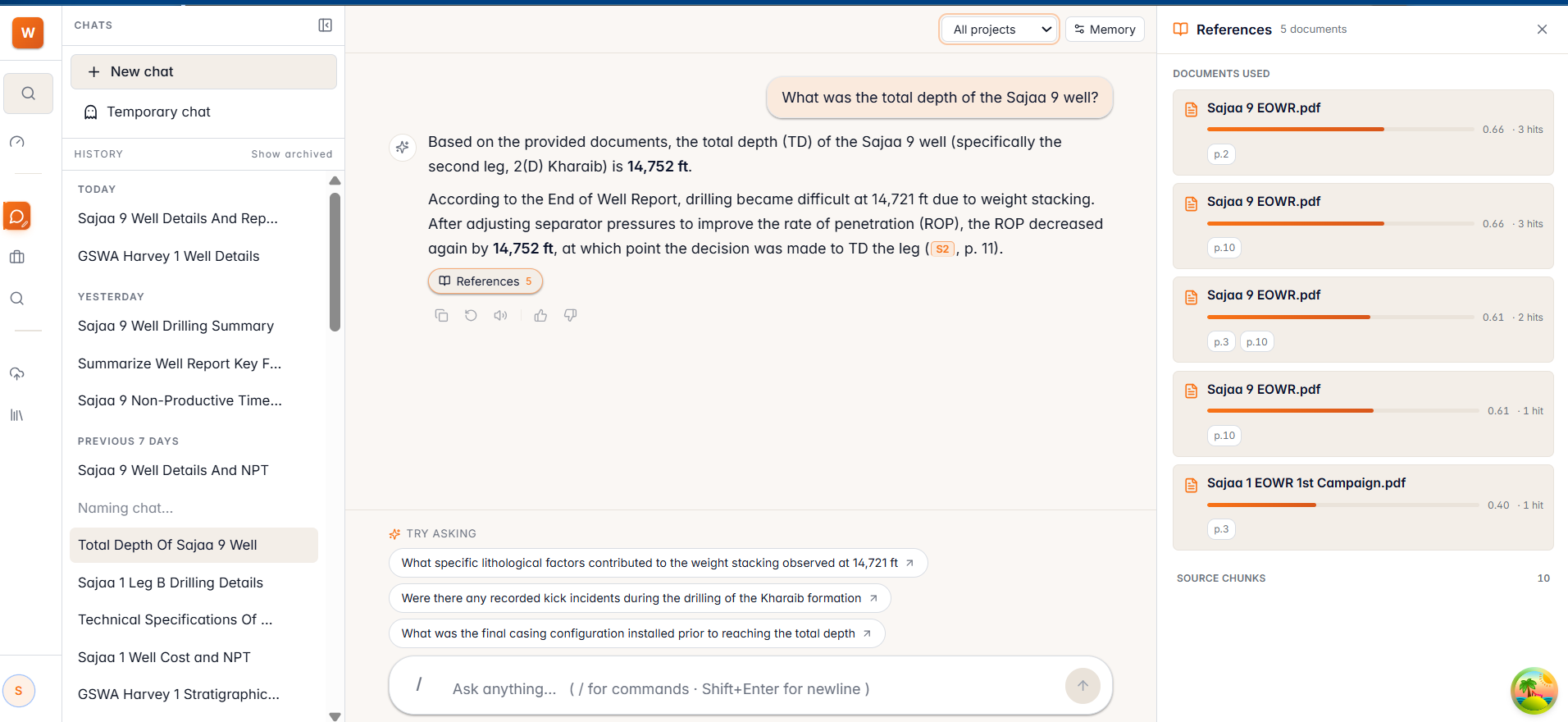
- Press Enter. The answer streams in, with source citations beneath it.
Work with answers
- Citations — select a source chip to open the references panel and see exactly which document and page the answer used.
- Scope — use the scope selector in the header to limit a conversation to a project or a document for sharper answers.
- Edit & resend — revise your most recent question to refine the result.
- Regenerate — ask WellSynth to take another pass at the last answer.
- Sessions — past conversations are listed so you can pick up where you left off.
Handy commands
/temp onand/temp off— toggle a temporary chat that isn't saved to history./clear— start a fresh conversation.
Note: WellSynth answers only from your documents and cites its sources. If the library doesn't contain the answer, it tells you rather than guessing.